發表文章

楊心美Python_Javascript網路執行_EXCEL_IRR二分法

圖片
588教學影片 擷取結果畫面 pmt = [0,0,0,0] #楊心美程式設計586設定串列list pmt[0]=float(input('楊心美躉繳金額: '))#float轉換成實數浮點數 for nper in range(1,4): pmt[nper] = float(input('第'+str(nper)+'期回收: ')) def npv(rate): y = - pmt[0] for j in range(1,4): y = y + pmt[j]/(1+rate)**j return y a, b, gap, f = 0.0, 1.0, 9.0, 9.0 maxerror = 0.000001 loopNumber = 1 while (gap > maxerror and abs(f) > maxerror and loopNumber < 100): loopNumber+=1 c = (a+b)/2; f = npv(c); if ( abs(f) > maxerror and gap > maxerror): if ( f>0 ): a = c else: b = c gap = b-a; print('楊心美報酬率: ', c) print('楊心美淨現值: ', f) print('楊心美迴圈次數: ', loopNumber) 這學期學會網路程式語言JAVASCRIPT也學會人工智慧使用最多的PYTHON語言 嵌入網頁的指令<IFRAME SRC="網址"> </IFRAME>

楊心美二分法求內部報酬率

圖片
head/head, body/body畫蛇添足,可拿掉,因為部落格架構已經下這些命令。資訊科學系的必修課「數值方法」或應用數學系的必修「數值分析」。 躉繳 第1期 第2期 第3期 注意,包含首期躉繳的現金流量都大於0。 輸出: 報酬率: 淨現值: 迴圈次數: 楊心美向劉任昌學習程式設計程式碼如下 <IFRAME WIDTH='100%' SRC='https://zh.wikipedia.org/zh-tw/%E4%BA%8C%E5%88%86%E6%B3%95_(%E6%95%B8%E5%AD%B8)'></IFRAME> head/head, body/body畫蛇添足,可拿掉,因為部落格架構已經下這些命令 <style> h1 {   margin: 0;   padding: 20px 0;       color:black;   text-shadow: 4px 4px 2px pink; } .Takming {   border: 20px outset red;   background-color: green;   color: white;   text-align: center;} .pmt {   width: 60pt;   height: 20pt;   background-color: coral;   color: white;   text-align: right;} </style> <table border="1"> <tr align="center"><td>躉繳</td><td>第1期</td><td>第2期</td><td>第3期</td></tr> <tr><td><input class="pmt" type="number" /></td>   ...

python tkinter繪圖對比EXCEL

圖片
def pv(r,n,m,f):#劉任昌函數參數r,n,m,f p = m/r*(1 - 1/(1+r)**n)+f/(1+r)**n return p#執行函數的結果傳回去 n=float(input('期數: '))#要計算轉為實數real nubers m=float(input('收付: '))#浮點點float f=float(input('終值: ')) for i in range(1,10):#迴圈 r = i*0.01 x=pv(r,n,m,f) print('利率 ', r ,'價格 ', x) import tkinter as tk#輸入tkinter繪圖 root = tk.Tk() root.title('楊心美python tkinter') root.geometry('600x600')#寬度width改成600 canvas = tk.Canvas(root, width=600, height=300) # 加入 Canvas 畫布 canvas.pack() x, y = 0, 0 canvas.create_line(0, 400, 500, 400, width=5,fill='black') canvas.create_line(5, 0, 5, 400, width=5,fill='purple') for x in range(1, 400): x1 = x+1 y1 = 400 - pv(x1,n,m,f)*400 canvas.create_line(x, y, x1, y1, width=5,fill='blue') canvas.pack() x = x1 y = y1 root.mainloop()

楊心美Javascript計算現值PresentValue和Python比較

圖片
利率y(rate) 期數n(nper) 金流m(pmt) 終值f(fv) 參考劉任昌金融市場講義https://drive.google.com/file/d/17z6UZgN5fC2XCO1L8_BQs57dgQXzbwou/view?usp=sharing 楊心美學習HTML+CSS+JavaScript程式碼 body指令拿掉,因為沒有作用。部落格已經設定body 在Spyder開發環境編寫與執行Python 第一個python沒有使用函數def '''PYTHON註解三個單引號或雙引號前後''' r=float(input('利率:'))#input輸入是字串string n=float(input('期數:'))#要計算轉為實數 m=float(input('收付:'))#浮點數float f=float(input('終值:')) pv=f/(1+r)**n pv +=m/r*(1-1/(1+r)**n) print('楊心美計算現值',pv)

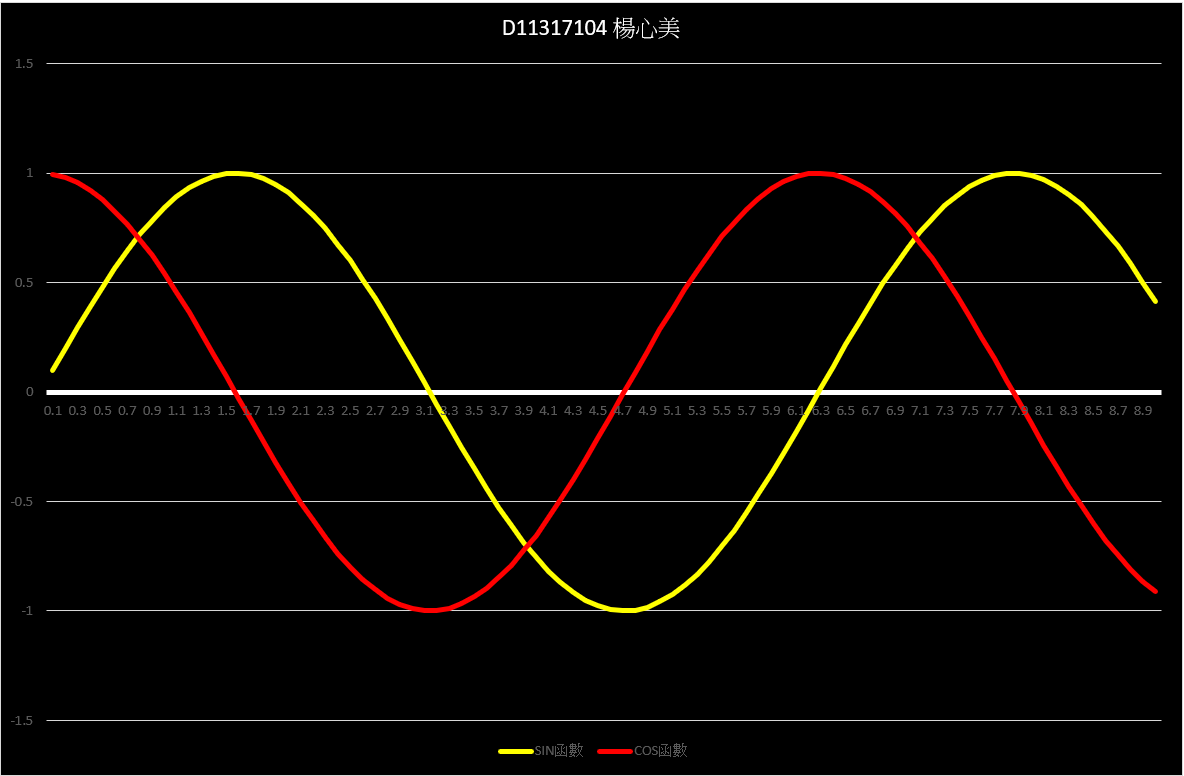
Javascript數學函數sin與cos對比EXCEL函數

圖片
Javascript在網頁就可以執行不需要開啟Spyder sin執行 cos執行 橫軸 程式碼 <style>BUTTON{BORDER:GREEN 5PX SOLID;BORDER-RADIUS:30PX;}</style> <h1>Javascript在網頁就可以執行不需要開啟Spyder</h1> <button onclick="LHsin()">sin執行</button> <button onclick="LHcos()">cos執行</button> <button onclick="xLine()">橫軸</button> <canvas height="400" id="my" style="background: black;" width="1200"></canvas> <script> var c = document.getElementById("my"); var cty = c.getContext("2d"); var g = 0.01;//增加一個廣域變數,用在下面的Math.sin(g*x); var h = 195; function LHsin() { var x = 0; var y = 200; cty.beginPath();  cty.lineWidth = 5;  cty.moveTo(x,y); while (x < 1000){   x = x + 1;   y = 200 - h * Math.sin(g*x);//數學Math正弦sin   cty.lineTo(x, y);   cty.strokeStyle = "yellow";   cty.stroke();    }; } function LHcos() { var x = 0; var y = 200-h;//上面的sin是y =200這裡要改掉 cty.beginPat...

三個Javascript函數sin,cos與canvas.font

Javascript在網頁就可以執行不需要開啟Spyder sin執行 cos執行 橫軸

楊心美Javascript執行三角函數繪圖

圖片
Javascript在網頁就可以執行不需要開啟Spyder 楊心美執行